Crear un submittal
Objetivo
Crear un submittal para un proyecto usando la herramienta Submittals del proyecto.
Contexto
En la industria de la construcción, un submittal es información escrita o física enviada por el subcontratista al contratista principal y después al equipo de diseño para la aprobación de la maquinaria, los materiales, etc., antes de que se fabriquen y se entreguen al proyecto. Los submittals se pueden presentar en varios formatos, como planos de taller, hojas sueltas sobre la maquinaria y muestras de material. Los submittals se requieren principalmente para que el arquitecto y el ingeniero verifiquen que se van a incluir los productos y las cantidades correctas en el proyecto, de acuerdo con los documentos de diseño/contrato.
Aunque cada empresa y proyecto puede tener su proceso específico, es habitual que el director de proyectos o el ingeniero sea el responsable de actuar como gestor de submittals. Primero, el administrador de submittal creará el submittal. A continuación, el subcontratista proporciona la documentación requerida para el submittal. Luego, cuando la documentación requerida está en su lugar, el envío se envía a los miembros del equipo de diseño correspondientes para su revisión y aprobación.
Temas a considerar
- Permisos de usuario necesarios:
- Para crear un submittal:
- Permisos de nivel de solo lectura o estándar en la herramienta Submittals con el permiso pormenorizado "Crear submittal" habilitado en la plantilla de permisos.
O BIEN - Permisos de nivel "Estándar" en la herramienta Presentaciones del proyecto sin una plantilla de permisos asignada.
O BIEN - Permisos de nivel "Administrador" en la herramienta Submittals del proyecto.
- Sin permisos de nivel "Administrador" en la herramienta Submittals del proyecto, solo puede añadir al flujo de trabajo de submittals usuarios con permisos de nivel "Administrador" en la herramienta Submittals del proyecto.
- Con permisos de nivel "Administrador" en la herramienta Submittals del proyecto, puede añadir al flujo de trabajo de submittals usuarios con permisos de nivel "Estándar" o superior en la herramienta Submittals del proyecto.
- Permisos de nivel de solo lectura o estándar en la herramienta Submittals con el permiso pormenorizado "Crear submittal" habilitado en la plantilla de permisos.
- Para crear un submittal:
- Ajustes de configuración:
- Al inicio de un nuevo proyecto, un usuario con permisos de nivel "Administrador" en la herramienta Submittals normalmente configurará los siguientes ajustes para su herramienta Submittals del proyecto:
- Códigos de coste. Los códigos de coste se gestionan en el segmento "Código de coste" de la estructura de desglose de trabajo de Procore.
- Gestor de submittals predeterminado. Consulte Designación del "Gestor de submittals predeterminado" para la herramienta Submittals.
- Distribución. Consulte Adición de un grupo de distribución al directorio del proyecto.
- Numeración. Consulte ¿Cómo se numeran los submittals en Procore?
- Cálculos de planificación. Consulte Cálculo de información de planificación del submittal (si está habilitado)
- Planificar tarea. Si la herramienta de planificación está activa en el proyecto, puede asociar el submittal con la tarea en la planificación del proyecto. Consulte la planificación.
- Secciones de especificaciones. Su proyecto puede configurarse para trabajar con la herramienta Especificaciones del proyecto o la herramienta Administrador del proyecto. Consulte ¿De dónde proceden las selecciones de la lista desplegable "Secciones de especificaciones" de la herramienta Submittals?
- Plantilla de flujo de trabajo de submittal. Su proyecto puede configurarse para utilizar plantillas de flujo de trabajo de submittal. Consulte Gestión de plantillas de flujo de trabajo de submittal.
- Al inicio de un nuevo proyecto, un usuario con permisos de nivel "Administrador" en la herramienta Submittals normalmente configurará los siguientes ajustes para su herramienta Submittals del proyecto:
- Información adicional:
- Los métodos alternativos para añadir submittals a un proyecto incluyen:
- Importar los submittals en la herramienta Submittals de nivel de proyecto. Consulte Enviar una plantilla de importación de submittals completa a Procore.
- Generación de un registro de submittals desde la herramienta Especificaciones de nivel de proyecto. Consulte generador de submittals: generar submittals a partir de especificaciones.
- Los métodos alternativos para añadir submittals a un proyecto incluyen:
Vídeo
Pasos
- Vaya a la herramienta Submittals del proyecto.
- Haga clic en + Crear > Submittal.
- Cree un nuevo submittal de la siguiente manera:
Adición de información general
Nota
Los usuarios con permisos estándar para la herramienta Submittals se limitan a ver los siguientes campos al crear un nuevo Submittal:
Título, Sección de especificaciones, Número y revisión, Tipo de envío, Contratista responsable, Recibido de, Fecha de vencimiento final, Ubicación, Planos vinculados, Lista de distribución, Bola en el tribunal, Privado, Descripción, Adjuntos
- Complete la introducción de datos en la pestaña General de la siguiente manera:
notas:
Si un submittal está abierto y no tiene flujo de trabajo, el responsable es el gestor de submittals y el elemento debería mostrarse en la herramienta Mis elementos abiertos.
Si un submittal está abierto y tiene un flujo de trabajo, la persona asignada al paso de flujo de trabajo actual tiene la responsabilidad. Una vez que se completa el flujo de trabajo , BIC vuelve al gestor de submittals.
Si un submittal está Cerrado, la persona responsable se borra.
-
Notas:
Cuando se produce la "Fecha de vencimiento final", el sistema envía una notificación automática por correo electrónico para notificar a los usuarios que el submittal está atrasado. Si su sistema está configurado para utilizar la aprobación secuencial, la notificación se envía al Submittal Manager y a la persona responsable del flujo de trabajo de aprobación. Si su sistema está configurado para utilizar la aprobación paralela, la notificación se envía al Administrador de envíos y a los miembros del flujo de trabajo de aprobación).
Cálculo de información de planificación del submittal (si está habilitado)
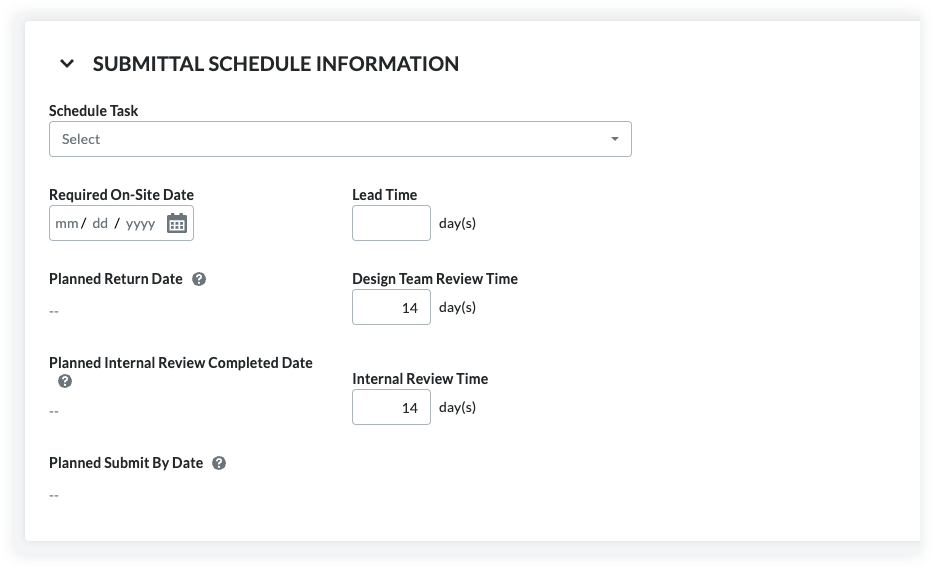
Cálculos de planificación para submittals es una función opcional que puede habilitar. Consulte Cómo habilitar cálculos de planificación para submittals. Cuando esté habilitada, la herramienta Submittals analizará las entradas en los campos "Fecha en que se requiere en la obra", "Plazo de entrega", "Tiempo de revisión de equipo de diseño" y "Tiempo de revisión interna", para proporcionar sugerencias para la "fecha límite" del remitente y aprobador en el flujo de trabajo del submittal. También rellena automáticamente los campos "Fecha prevista de devolución", "Fecha prevista de finalización de revisión interna" y "Fecha límite prevista de presentación".
- Follow the steps in Create a Submittal.
This reveals the New Submittal page. - Scroll down to the Submittal Schedule Information area.
- Set the following information:
- Schedule Task. The schedule task associated with the submittal being created. A schedule must be uploaded to the project first. See Upload a Project Schedule File to Procore's Web Application.
- Note: If you enter 7, the system subtracts '7' calendar days from the Planned Return Date to automatically populate the date entry for the Planned Internal Review Completed Date.
- Note: If you enter 10, the system subtracts '10' calendar days from the Required On-Site Date to automatically populate the date entry for the Planned Return Date.
-
Note: If you enter 5, the system subtracts '5' calendar days from the Planned Internal Review Completed Date to automatically populate the date entry for the Planned Submit by Date.
This illustration shows you an example of these entries and calculations.
Actualización de la información de entrega
- Fecha de entrega esperada
Consulte la fecha que se muestra en la fecha de entrega esperada. Esta es la fecha entre el "Plazo de entrega" y el momento en que se distribuyó el submittal, y no se rellenará en el momento de la creación del submittal. Procore calcula esta fecha una vez que se ha distribuido el submittal. Consulte Distribución de un submittal. - Tarea de planificación
Si ha habilitado la herramienta Planificación en el proyecto y ha integrado un Asta Powerproject, Microsoft Project o Planificación de Oracle Primavera con Procore, podrá seleccionar una tarea de proyecto en la lista desplegable Tarea de planificación cuando disponga de una cuenta de usuario con permiso de nivel de "Solo lectura" o superiores en la herramienta Planificación. Esto es solo para referencia. - Fecha de entrega confirmada
Seleccione la fecha en que el subcontratista o proveedor confirmó que llegaría el transporte utilizando el calendario Fecha de entrega confirmada. - Fecha de entrega real
Seleccione la fecha en que el material llegó a la obra utilizando el calendario Fecha de entrega real. Normalmente, el jefe de obra del proyecto actualiza este valor.
Aplicar una plantilla de flujo de trabajo de submittal a un submittal
Un usuario con permisos de "Administrador" para la herramienta Submittals de su proyecto puede crear una (1) o más plantillas de flujo de trabajo de submittal que puede usar al crear nuevos submittals. Esto ahorra tiempo de introducción de datos porque evita que tenga que añadir un nuevo flujo de trabajo de submittal cada vez que cree un submittal.
- En Flujo de trabajo de submittal, haga lo siguiente:
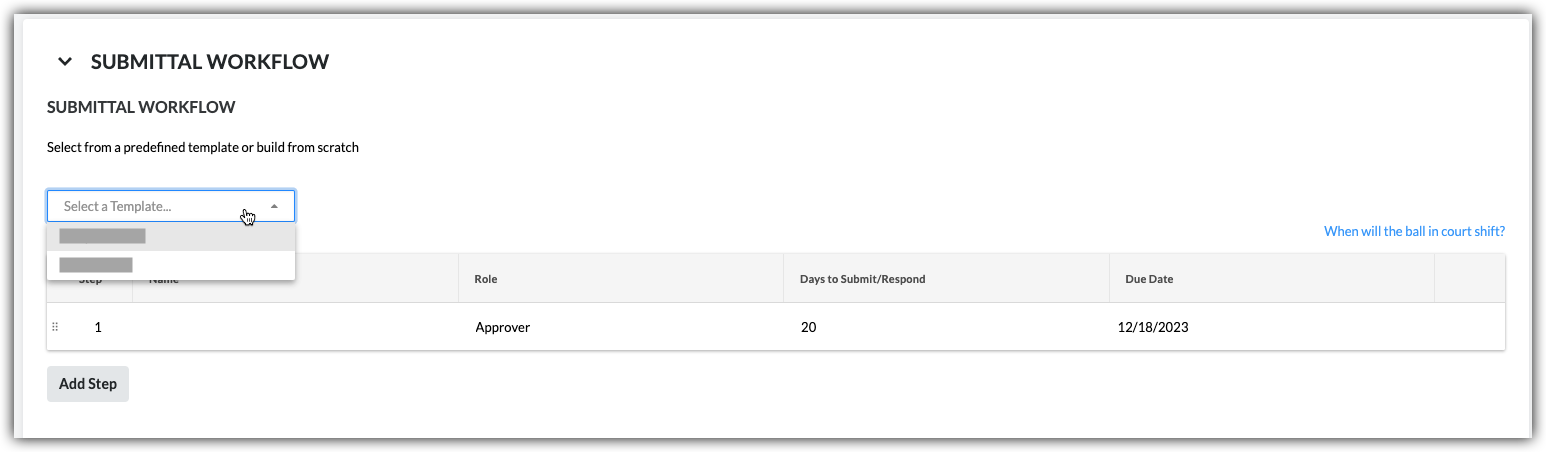
- Seleccione una plantilla. Seleccione una plantilla de flujo de trabajo en la lista desplegable.
Notas:- Esta lista desplegable solo está visible y disponible para los usuarios con permisos de nivel "Administrador" en la herramienta Submittals.
- Esta acción aplica las personas nombradas en la plantilla de flujo de trabajo de submittal a su submittal.
- Para saber cómo se crean las plantillas de flujo de trabajo de submittal, consulte Gestionar plantillas de flujo de trabajo de submittal.
- Seleccione una plantilla. Seleccione una plantilla de flujo de trabajo en la lista desplegable.
- Continúe modificando los campos Nombre, Rol y Días para enviar/responder según sea necesario para el submittal. Sus cambios solo afectan al flujo de trabajo del submittal, sus cambios NO afectan a la plantilla de flujo de trabajo de submittal.
- (Opcional) Continúe con los pasos de Adición de usuarios al flujo de trabajo de submittal.
Adición de usuarios al flujo de trabajo de submittal
- En Flujo de trabajo de submittal, haga lo siguiente para cada partida deseada del submittal:
- Nombre. Comience a escribir el nombre de un usuario del proyecto en el cuadro Buscar. A continuación, seleccione al usuario apropiado de la lista.
- Si desea indicar que se requiere una respuesta por parte del usuario, marque la casilla de verificación junto al nombre de esa persona.
O BIEN - Si NO desea solicitar una respuesta del usuario, elimine la marca de la casilla de verificación.
Nota: Si está añadiendo más de un usuario a un grupo de flujo de trabajo de aprobación paralelo, la responsabilidad pasará al siguiente grupo de flujo de trabajo después de que todas las personas marcadas como obligatorias en el grupo envíen una respuesta al submittal.
- Si desea indicar que se requiere una respuesta por parte del usuario, marque la casilla de verificación junto al nombre de esa persona.
- Rol. Seleccione Aprobador o Remitente de la lista. Consulte ¿Cuál es la diferencia entre un remitente y un aprobador en submittals?
Notas:- Para ser designada como aprobador, la persona debe existir en la herramienta Directorio de nivel de proyecto (consulte Adición de una cuenta de usuario al directorio de proyecto) y se le deben otorgar permisos de nivel de administrador o estándar para la herramienta Submittals (consulte Cómo establecer los permisos de usuario para la herramienta Submittals).
- Si es un usuario con permisos de nivel "Estándar" en la herramienta Submittals, solo puede añadir usuarios con permisos de nivel "Administrador" al flujo de trabajo.
- Si piensa añadir un Remitente al submittal, se recomienda designar un gestor de submittals como primer responsable de aprobación en el flujo de trabajo de aprobación secuencial del submittal. Esto le da al gestor de submittals la posibilidad de asegurarse de que la parte interesada interna revise minuciosamente el submittal antes de enviarlo a los usuarios en el siguiente paso del flujo de trabajo de submittal.
- Si es un usuario con permisos de nivel "Administrador" para la herramienta submittals, puede añadir usuarios con permisos de nivel "Administrador" o "Estándar" al flujo de trabajo.
Nota: Si desea que el flujo de trabajo de submittal utilice la aprobación secuencial, añada solo un usuario a cada partida en el flujo de trabajo. Si desea que un paso del flujo de trabajo de submittal utilice la aprobación paralela, añada dos o más usuarios a una partida.
- Fecha límite. Seleccione en el calendario una fecha límite para la respuesta al submittal.
Nota: El campo "Fecha límite" se rellena automáticamente según el número predeterminado de días especificado en la página Ajustes de configuración de la herramienta Submittals. Consulte Ajustes de configuración: herramienta Submittals. La fecha límite también tiene en cuenta qué días están definidos como días laborables para el proyecto. Consulte Configuración de días laborables de proyecto.
- Nombre. Comience a escribir el nombre de un usuario del proyecto en el cuadro Buscar. A continuación, seleccione al usuario apropiado de la lista.
- Haga clic en Añadir paso.
- Repita estos pasos para añadir otro usuario al flujo de trabajo.
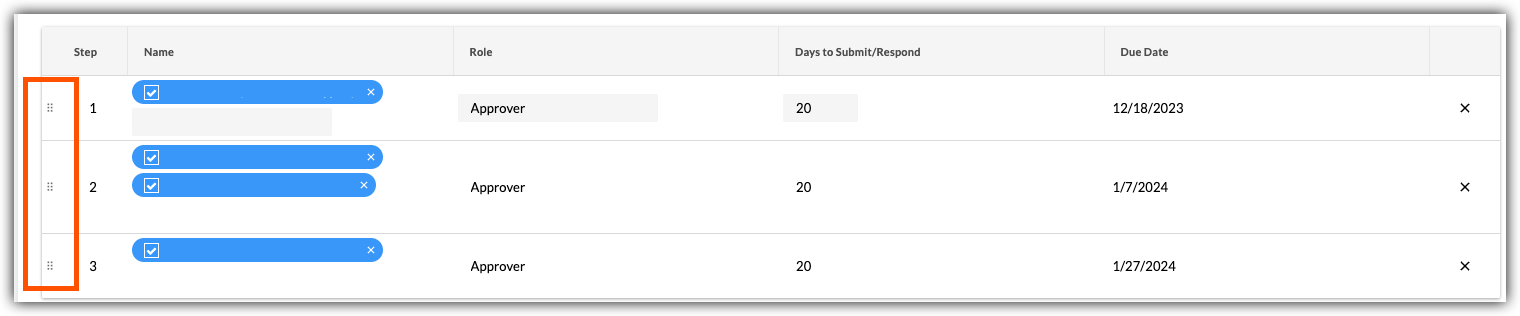
- Si desea cambiar el orden de los pasos del flujo de trabajo, haga lo siguiente:
- Tome la partida por el pinzamiento vertical (⋮⋮).
- Utilice una operación de arrastrar y soltar para mover la partida al orden deseado.
Actualización y envío del submittal para su revisión
Cuando haya terminado con los pasos anteriores, elija una de estas opciones:
- Para guardar los cambios sin enviar un correo electrónico a los miembros del flujo de trabajo de submittal, a los miembros de la lista de distribución y al gestor de submittals, haga clic en Crear.
O bien - Para guardar los cambios y enviar una notificación por correo electrónico para avisar a los miembros del flujo de trabajo de submittal y a los miembros de la lista de distribución, haga clic en Crear y enviar correos electrónicos.
 .
.