Añadir un pago nuevo a la pestaña "Pagos emitidos" de un pedido
Importante
Nota del autor: Registre todos los cambios de Facturación y pagos en: https://procoretech.atlassian.net/browse/ILR-469SOPORTE TÉCNICO DE PROCORE: NOTAS INTERNAS
En esta página se detalla la experiencia modernizada de la herramienta Pedidos. Hay disponible un tutorial para la experiencia heredada en la herramienta Pedidos en este vínculo: https://support.procore.com/products...na-commitment
For Procore Customers in the United States
 When your company applies the 'Owners English' or 'Specialty Contractors English' point-of-view dictionary, you'll see different tool names and term changes in the user interface. Learn how to apply the dictionary options.
- To learn the differences: Show/Hide
Objetivo
Para registrar manualmente cualquier pago que su empresa emita para un compromiso como administrador de facturas .
Contexto
Para registrar manualmente cualquier pago emitido al <a title=" " href.path="//faq/what-is-a-downstream-collaborator" href.nombre de archivo de filename =""> en un compromiso, utilice la pestaña "Pagos emitidos" en el compromiso.
- Para empresas que utilizan Procore Pay: Mostrar/Ocultar
- Para obtener más información sobre la configuración necesaria para realizar un seguimiento y administrar con precisión los pagos de cheques conjuntos cuando se utiliza Procore Pay para pagar facturas de subcontratistas, lea Acerca de los cheques conjuntos con Procore Pay.
Temas a considerar
Pasos
- Vaya a la herramienta Facturación del proyecto.
- Haga clic en la pestaña Subcontratista.
- Busque el contrato o la factura para el nuevo registro de pagos.
- Elija entre estas opciones para abrir el compromiso.
- Contrato. Haga clic en el vínculo Contrato para abrir el compromiso.
- Factura n .º Haga clic en el enlace Factura # y luego haga clic en el enlace Contrato # ruta de navegación.
- En el compromiso, haga clic en la pestaña Pagos emitidos.
- Haga clic en Añadir pago.
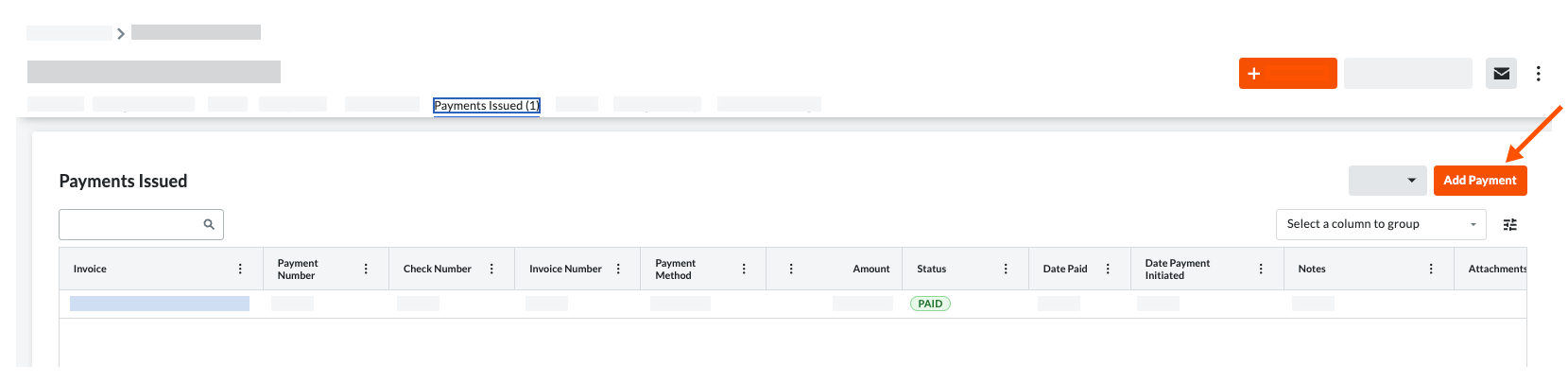
- En el mensaje Añadir pago, introduzca:
- Factura. Seleccione una factura existente en el menú desplegable al que se adjunta el pago emitido.
- Pago n .º Introduzca el número de pago relacionado para el pago emitido.
- Método de pago . Seleccione un método de pago en la lista desplegable: Cheque, Tarjeta de crédito y Electrónico.
- Importe. Introduzca el importe del pago.
- Fecha. Introduzca la fecha de emisión para el pago
- Factura n .º Introduzca el número de factura relacionado para el pago emitido.
- Cheque n .º Introduzca el número de cheque relacionado para el pago emitido.
- Notas. Introduzca cualquier nota adicional con respecto al pago emitido para fines de registro.
- Adjuntos. Adjunte todos los archivos o documentos relevantes.
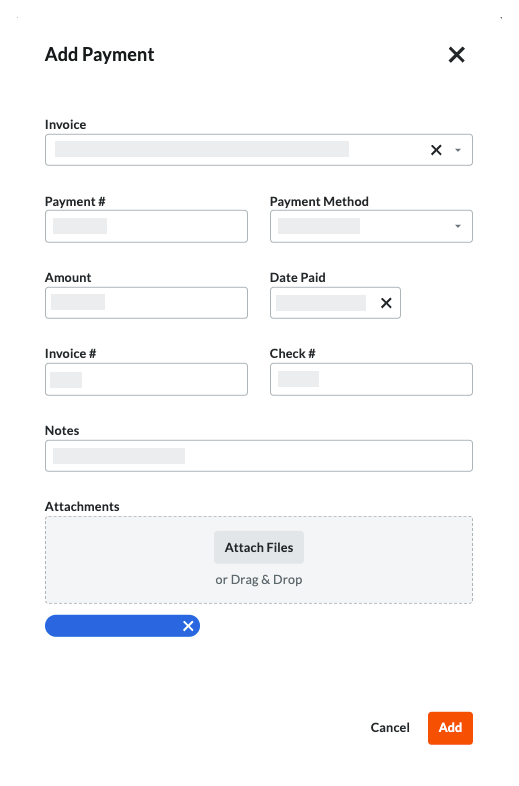
- Haga clic en Añadir.
 .
.